How to start playing on EuroAion
Four simple steps — and you're in the game. Completely free to play!
-
Create your account
Sign up on the site: pick a login (case-sensitive), enter a working email and a password.
You'll get a confirmation email — click the link inside. If it doesn't arrive, check your Spam and Promotions folders.
Go to registration -
Download the game client
Aion 4.6 game client and Windows OS are needed for playing. Both 32-bit and 64-bit are supported.
Three download methods: launcher (recommended — checks and updates everything automatically), torrent, or direct link.
The game client is ready-to-play, no patching needed.
Go to downloads -
Launch the game and log into your account
After installation open the EuroAion launcher, pick the client language and your system architecture (64-bit by default).
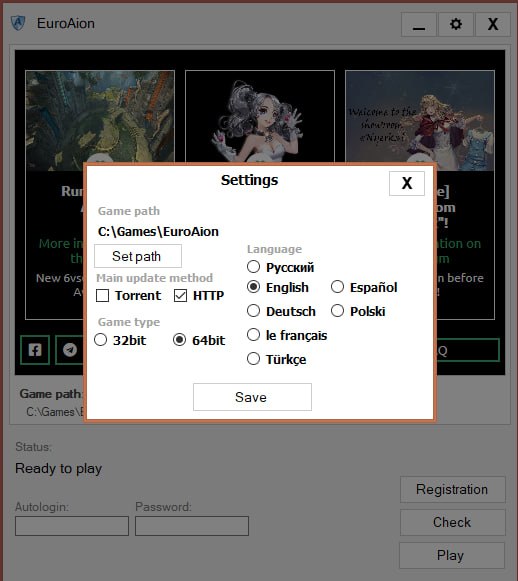
Launcher settings (the gear icon in the top-right): here you change the install path, update method and client architecture. Enter the login and password from the site — it's the same account.
Click «Play» — the client will connect to our server on its own.
-
Create your character and start playing
Pick a faction — Elyos or Asmodian — and a class.
Gain your first levels in the starter zone: the quests here will provide you with basic gear and teach you the core game mechanics.
-
Need help?
If something isn't working, the game won't install or you've got other questions about the game — feel free to reach us out in our support channels.
You'll receive a prompt reply from our support team and active community.
- Forum: forum.euroaion.com
- Discord: discord.gg/kgBSnXmNjH
At a glance
| Client version | Aion 4.6 «Legacy of the Phoenix» |
|---|---|
| Client size | ~45 GB |
| Operating system | Windows 7 or newer (x86 / x64) |
| Server location | Europe (Germany) |
| Rates | classic x1 (XP, drop, quests, Kinah) |
| Running since | 2019, no wipes |
| Players online | displayed in the site header in real time, 1000+ in the evenings |
| Registration | login + email + password |
| Cost | free, no pay-to-win |
| Client languages | EN / RU / DE / FR / ES / PL / TR |
Minimum system requirements
- CPU: Intel Core 2 Duo 2.4 GHz / AMD Athlon 64 X2 4400+ or better
- RAM: 2 GB
- GPU: NVIDIA GeForce 7600 GT / ATI Radeon HD 2600 or newer, 512 MB VRAM
- DirectX 9.0c
- Disk space: ~45 GB
What about macOS or Linux?
The native client is Windows-only. There are no official builds for macOS or Linux.
On Mac, players run the client through CrossOver, Wine or Whisky; on Linux — through Wine or Proton. These are unofficial setups, and we don't provide support for launching the game on platforms other than Windows.
